
Renovate AI : House Design
Trial & Error AIHouse & Home
4.694.00 Reviews
- Version
- 5.2.7
- Installs
- 100.00K
- Age Rating
- Everyone
Screenshots
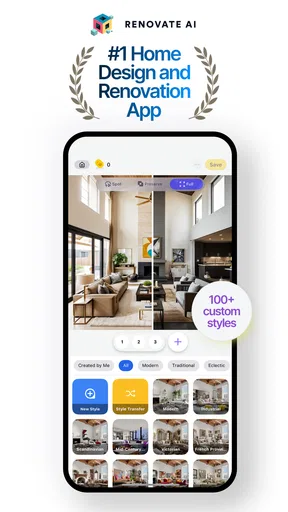
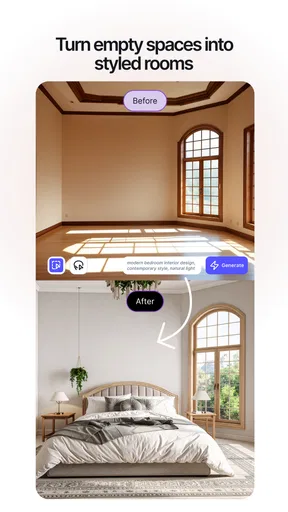

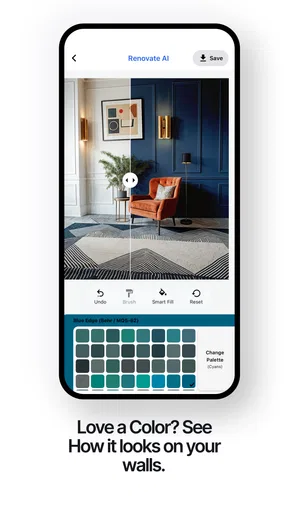
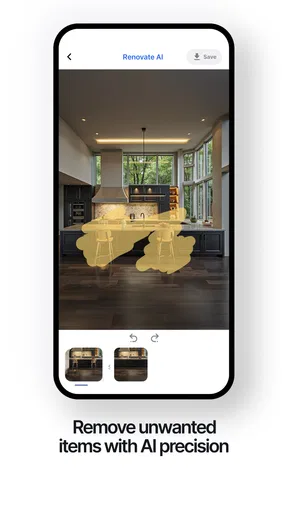
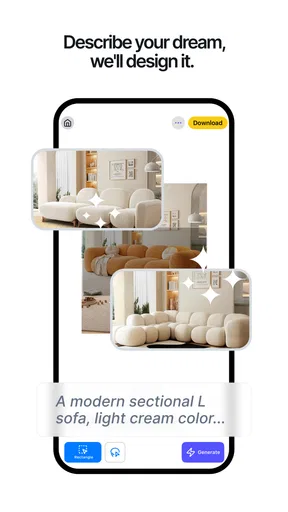
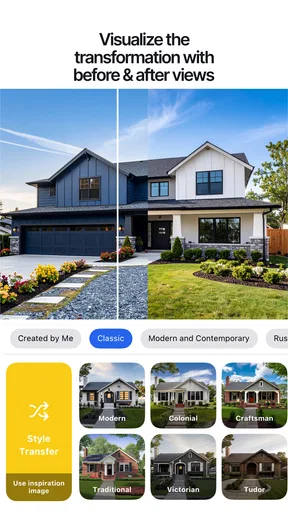
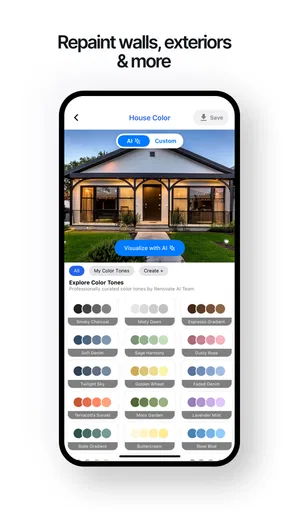
Our Review of Renovate AI : House Design
 Analysis by Appyee
When I’m considering a room change, the hardest part is often picturing the result before spending money or moving furniture. Renovate AI: House Design offers a way to explore possibilities using a photo of your own space, which makes it more useful for early inspiration than scrolling through polished rooms that look nothing like home. I’d treat it as a visual brainstorming tool, not a substitute for measurements, a contractor, or a fully planned renovation.
A quick way to test a direction
Renovate AI is a free home-design app from Trial & Error AI, with optional in-app purchases ranging from $4.99 to $99.99 per item. It has a 4.4 average from around 2.8 thousand ratings, and more than 100 thousand installs. That gives a prospective user a useful sense of its reach, though ratings alone can’t tell you whether its style suggestions will suit your particular room.
The practical appeal is the short path from idea to preview: use a room photo, try a different look, and decide whether the direction is worth exploring. I can see this helping when you’re stuck between two broad moods—say, a lighter, calmer living room or one with stronger color—rather than when you need a precise specification for buying a sofa or ordering materials.
Getting Started with Renovate AI
First things first, downloading and setting up Renovate AI: House Design is a breeze. The app is available on both Android and iOS, making it accessible to pretty much everyone. Once you’ve got it on your device, the user interface greets you like a warm hug—simple, intuitive, and easy to navigate.
Upon launching the app, you’re prompted to either take a photo of your room or upload one from your gallery. This feature is super handy because it allows you to work with your actual space rather than a generic template. You can start playing around with different design elements almost immediately. It’s like magic seeing your room transform right before your eyes!
Features That Make It Stand Out
What sets Renovate AI apart from other design apps is its use of artificial intelligence. The AI suggests design elements based on your preferences, ensuring that the style aligns with your taste. You can tweak colors, furniture, and even add décor items to see how they’d fit into your space.
The app also offers a wide range of furniture and décor items to choose from. Whether you’re into minimalist designs or something a bit more eclectic, there’s something for everyone. The 3D visualization feature is particularly impressive—giving you a realistic view of how your choices will look in real life.
Planning a real room refresh
A useful way to approach the photo workflow is to take a clear, uncluttered shot from a corner or doorway, then keep the camera angle and lighting consistent when you compare ideas. Before-and-after images are easier to judge when the room itself hasn’t changed between attempts. I’d also photograph the space in daylight if possible; shadows from lamps or a bright window can influence how a color reads in a preview.
For example, imagine you’re deciding whether to refresh a small bedroom before guests arrive. You could photograph it as it is, explore a calmer palette, and compare that with a bolder look before buying bedding or moving a dresser. The useful outcome isn’t necessarily a finished plan. It may simply reveal that the room feels crowded because of the arrangement, or that a color you liked on a screen competes with the floor and curtains you already have.
That distinction matters: a visual concept can help you choose a direction, but it doesn’t establish exact dimensions, clearances, product availability, or construction requirements. I wouldn’t use an attractive generated arrangement as proof that a real bed will fit beside a door or that a particular paint shade will look identical on the wall. Measure the room and check samples separately before making purchases.
Making comparisons more useful
Instead of asking the app to solve an entire room at once, I’d use it to answer one question per round: should the room feel warmer, should the furniture look lighter, or is a more decorative style worth trying? Changing one broad choice at a time makes it easier to see what is driving your preference. If you alter the mood, furniture, and décor all together, a result may look appealing without telling you which part actually works.
It can also help to save a few contrasting options rather than polishing one favorite immediately. A restrained version and a more adventurous version give you a meaningful comparison, especially if you’re sharing the decision with someone else. When you look again later, ask what still feels right and what only seemed exciting in the moment. That small pause can prevent a quick visual preference from turning into an expensive commitment.
Compared with browsing inspiration boards or interior-design photos, working from your own room makes the exercise feel more personal. Those alternatives are often better for collecting references and seeing real completed projects, while this app is aimed at imagining a change in the space you already have. Compared with professional design software, it is the more approachable option for casual exploration, but it should not be expected to deliver the same precise planning workflow. The right choice depends on whether you want inspiration, a realistic layout, or technical documentation.
Playing with Design Ideas
One of my favorite things about Renovate AI is how it allows you to experiment without consequences. You can mix and match different styles and colors without worrying about making a permanent decision. Feel like trying out that bold, red accent wall? Go for it! You’ll see instantly whether it complements your room or not.
Moreover, the app provides design tips and tricks tailored to your specific room dimensions and lighting conditions. It’s like having a design guru whispering useful advice as you go along. You’ll find yourself learning a lot about interior design principles without even realizing it.
Where expectations need a reality check
The main trade-off with photo-based design is that an appealing image can feel more definitive than it is. Existing furniture, room proportions, windows, and the camera perspective all shape what you see. Treat a preview as a conversation starter: it can help you explain a preference to a housemate or designer, but it cannot replace checking whether a proposed change works in daily life.
I’d be cautious about using visual suggestions to make decisions that depend on exact fit, electrical work, plumbing, or structural changes. Those call for measurements and qualified advice. For a rental, a shared home, or a tight budget, the app is most useful for testing reversible ideas—color, general style, and décor direction—before you spend. If you need a precise floor plan or shopping list tied to real products, a dedicated planning tool or a professional may be a better fit.
Another practical question is whether the free experience will be enough. The app is free to download, but optional purchases can add up, with individual items priced from $4.99 to $99.99. I’d begin with the basic experience and decide whether a paid option solves a specific problem you actually have. Avoid paying simply because a preview looks exciting; first establish what you want to compare and whether the available result helps you make that choice.
User Experience and Functionality
The app runs smoothly, with minimal lag or crashes, which is a huge plus. I found the overall experience to be quite satisfying. The design suggestions are spot on, and the ability to save and share your designs is fantastic. You can even create mood boards to keep track of your favorite styles and pieces.
However, as with most apps, there are in-app purchases that unlock additional features and design elements. While the free version is pretty comprehensive, the premium options open up a world of possibilities for those willing to invest a little more.
Who will get the most from it
I’d recommend it most to someone who knows a room needs a change but can’t yet describe what kind. First-time decorators, people preparing a home for a small refresh, and anyone who wants to compare broad visual moods can get value from turning a familiar room into a starting point. It may also help a couple or family discuss preferences: a picture is often easier to react to than a vague suggestion like “make it cozier.”
On the other hand, I’d skip it if your main goal is an accurate renovation plan, a measured layout, or a guarantee that a chosen item will fit and look exactly as shown. It is also less compelling if you already have a clear design and simply need to source real furniture. In those situations, measuring tools, retailer catalogues, a floor-plan app, or a human designer may answer the important question more directly.
For Android users, the listed minimum operating-system requirement is version 7.0. The app is rated Everyone, so its home-design focus is suitable for a broad audience. It was released on July 7, 2023, and the current version is 4.4.73. That version information describes the current release, but it doesn’t by itself tell me which particular features changed over time. I’d judge an update by whether it improves the workflow I rely on, rather than assuming a newer version means more accurate room planning.
What to keep an eye on
If you’re already using the app, the most useful measure of progress is whether your saved concepts remain easy to compare and whether the suggestions help you make clearer decisions. I’d watch for practical improvements to how consistently a room photo is interpreted, how controllable the design changes feel, and how clearly paid options are presented. Those are the kinds of details that affect everyday usefulness more than a longer menu of styles on its own.
For a new user, I’d start with one room and one modest question, such as whether a lighter overall look would make the space feel more open. Keep the original photo, try a small set of contrasting directions, and use the best result to guide real-world checks—not to skip them. That approach gives the app a clear job and makes it easier to tell whether it is helping before you consider any purchase.
Final Thoughts
All in all, Renovate AI: House Design is a must-have for anyone looking to spruce up their living space. Whether you’re planning a major renovation or just want to try out some new looks, this app provides the tools you need to visualize and execute your ideas effortlessly.
So, if you’re ready to unleash your inner designer, give Renovate AI a try. It’s a fun, creative, and practical way to breathe new life into your home. Who knew redesigning your space could be so easy and enjoyable? Happy decorating!
Verdict
Strengths of Renovate AI : House Design
- User-friendly interface for easy navigation.
- Wide range of design templates available.
- Realistic 3D visualization of designs.
- Seamless integration with smart devices.
- Regular updates with new features.
Limitations of Renovate AI : House Design
- Limited free features; premium needed.
- Occasional lag in 3D rendering.
- Requires high-performance devices.
- In-app purchases can add up.
- Limited support for older OS versions.
Similar Picks in This Category
View All
Universal TV Remote Control
CodeMatics Media Solutions3.9

AlfredCamera Home Security app
Alfred Systems Inc.4.7

Planner 5D: AI Home Design
Planner 5D4.5

Universal Tv Remote-Cast to TV
One Music Player4.1

Zillow: Homes for Sale & Rent
Zillow Group4.8

99acres Buy/Rent/Sell Property
infoedge.com4.3
Frequently Asked Questions
What is Renovate AI: House Design?
Renovate AI: House Design is a mobile app designed to help users virtually redesign and remodel their living spaces. Using advanced AI technology, the app provides a realistic visualization of home renovations, allowing users to experiment with different styles, colors, and furniture layouts without any physical changes.
How user-friendly is Renovate AI: House Design for beginners?
Renovate AI: House Design is highly user-friendly, even for beginners. The app features an intuitive interface with easy-to-follow tutorials and guided steps to help users create designs. Whether you're a design novice or a seasoned professional, the app caters to all skill levels with customizable options.
What features does Renovate AI: House Design offer?
The app offers a variety of features, including a wide range of furniture and decor items, color palettes, and material options. Users can also access virtual reality modes for a more immersive experience, as well as the ability to save and share their designs with others for feedback and collaboration.
Is Renovate AI: House Design available on both Android and iOS?
Yes, Renovate AI: House Design is available for download on both Android and iOS platforms. The app can be downloaded from the Google Play Store for Android devices and the Apple App Store for iOS devices, ensuring accessibility for a wide range of users.
Does Renovate AI: House Design require an internet connection?
While basic features of Renovate AI: House Design can be used offline, an internet connection is recommended for accessing the full suite of functionalities. Features such as downloading new design elements, sharing designs, and receiving updates require connectivity to function optimally.
